 Pipedrive
Lightweight CRM with kanban pipeline view
From $14/seat/mo · annual commitment
Price checked Oct 26, 2026
Capterra 4.5/5 ↗ · 3,064 reviewsSource snapshot checked Saved source copy; current rating may differ.

Sales CRM with contact and deal management, calling and reporting. Email sequences and advanced sales automation require Professional or Enterprise; free tools and Starter have narrower capabilities.
Keep contacts, deals and the next action together. Reps and managers get a shared view of the pipeline. Compare alternatives if you mainly need a prospect database, a sending tool or a flexible monthly budget for sequences, or if your existing CRM already works well.
Smart CRM holds your records; Sales Hub adds sales tools. Marketing Hub and Service Hub are separate products.
Compare the HubSpot and Apollo workflows| Feature | FreeCost | StarterCost | ProfessionalCost | EnterpriseCost |
|---|---|---|---|---|
| Main job | Contacts, deals & manual tasks | Shared CRM + deal-stage tasks | Email sequences + sales automation | Advanced sales controls |
| Price & payment | $0Free plan | $20/seat/mobilled monthly | $100/seat/mobilled monthly with a 12-month commitment$90/seat/mo · annual payment$1,080 per seat for 12 months. | $150/seat/moPaid annually · 12-month contract$1,800 per seat for 12 months. |
| Automation | Manual tasks. No sales email sequences. | Tasks and internal notifications when a deal changes stage. No sales email sequences. | Email sequences, full workflows, forecasting and custom reports. | Workflow-triggered sequences, higher limits and advanced controls. |
| Access | Up to 2 users · 1,000 contacts | Core Seat for each paid user. Email support included. | Sales Seat for each rep. Sequences need a connected personal work inbox. | Sales Seats. Confirm the specific capability and setup you need. |
| Required onboarding | None required | None required | $1,500once per account · extra | $3,500once per account · extra |
Standard paid prices are per person; confirm current terms with HubSpot. Sequences combine timed emails and tasks; workflows automate CRM actions. Sequence requirements (opens in a new tab).
Organize your first sales pipeline
Contacts, deals, manual tasks and basic reports.
Keep in mind: Up to 2 users and 1,000 contacts. No automated email sequences.
Up to 2 users
Annual prices are monthly equivalents of a 12-month commitment. Missing prices or terms require vendor confirmation. Contract terms · checked Oct 26, 2026 ↗
Applies to Sales Hub seat-based plans. HubSpot also offers flexible seats-and-credits pricing with different terms. Confirm which model your quote uses; extra credit usage and integrations may cost more.
Additional cost source · checked Oct 16, 2026 ↗Gmail: listed for this plan.
Individual work email is available across plans; email sequences additionally require Professional or Enterprise and an assigned Sales Seat.
Personal email access is required. A View-only seat cannot connect an inbox. The same address cannot serve as both an individual and team inbox. Gmail accounts enrolled in Google Advanced Protection are not supported.
Official source · checked Nov 11, 2026 ↗Microsoft Outlook: listed for this plan.
Individual work email is available across plans; email sequences additionally require Professional or Enterprise and an assigned Sales Seat.
Personal email access is required. A View-only seat cannot connect an inbox. The same address cannot serve as both an individual and team inbox. Microsoft 365 shared mailboxes are not supported as individual work email connections.
Official source · checked Nov 11, 2026 ↗Salesforce: plan eligibility needs confirmation.
Available with Sales Hub Professional or Enterprise. A qualifying Professional or Enterprise subscription in another Hub may also provide access; confirm your account entitlement.
Requires HubSpot Account Access and a Salesforce administrator with the documented API and object permissions. Salesforce Professional or an edition with API access is required; Group Edition is not supported. One Salesforce instance per HubSpot account; API limits apply.
Official source · checked Nov 11, 2026 ↗LinkedIn Sales Navigator: not included in this plan.
Sales Hub Professional or Enterprise plus LinkedIn Sales Navigator Advanced Plus. Budget for both products.
Each user connects their own Sales Navigator Advanced Plus account and needs an assigned Professional or Enterprise Sales Seat. A HubSpot admin may need to add the integration card to record layouts.
Official source · checked Nov 11, 2026 ↗Share a CRM and automate simple deal tasks
Create tasks and internal notifications when a deal changes stage. Includes email support.
Keep in mind: Still no sequences of automated sales emails. Each paid user needs a Core Seat.
Standard list price is $20/Core Seat/month. The advertised $7 offer is temporary; eligibility and renewal price require confirmation and are excluded from this recurring estimate.
Annual prices are monthly equivalents of a 12-month commitment. Missing prices or terms require vendor confirmation. Contract terms · checked Oct 26, 2026 ↗
Applies to Sales Hub seat-based plans. HubSpot also offers flexible seats-and-credits pricing with different terms. Confirm which model your quote uses; extra credit usage and integrations may cost more.
Additional cost source · checked Oct 16, 2026 ↗Gmail: listed for this plan.
Individual work email is available across plans; email sequences additionally require Professional or Enterprise and an assigned Sales Seat.
Personal email access is required. A View-only seat cannot connect an inbox. The same address cannot serve as both an individual and team inbox. Gmail accounts enrolled in Google Advanced Protection are not supported.
Official source · checked Nov 11, 2026 ↗Microsoft Outlook: listed for this plan.
Individual work email is available across plans; email sequences additionally require Professional or Enterprise and an assigned Sales Seat.
Personal email access is required. A View-only seat cannot connect an inbox. The same address cannot serve as both an individual and team inbox. Microsoft 365 shared mailboxes are not supported as individual work email connections.
Official source · checked Nov 11, 2026 ↗Salesforce: plan eligibility needs confirmation.
Available with Sales Hub Professional or Enterprise. A qualifying Professional or Enterprise subscription in another Hub may also provide access; confirm your account entitlement.
Requires HubSpot Account Access and a Salesforce administrator with the documented API and object permissions. Salesforce Professional or an edition with API access is required; Group Edition is not supported. One Salesforce instance per HubSpot account; API limits apply.
Official source · checked Nov 11, 2026 ↗LinkedIn Sales Navigator: not included in this plan.
Sales Hub Professional or Enterprise plus LinkedIn Sales Navigator Advanced Plus. Budget for both products.
Each user connects their own Sales Navigator Advanced Plus account and needs an assigned Professional or Enterprise Sales Seat. A HubSpot admin may need to add the integration card to record layouts.
Official source · checked Nov 11, 2026 ↗Send timed sales emails and automate follow-up
Email sequences, full workflows, forecasting and custom reports.
Keep in mind: Each rep using these features needs a Sales Seat. Sequences also need a connected personal work inbox.
Annual payment: $1,080 per seat for 12 months.
Required onboarding: $1,500 once per account, on top of the subscription.
Calculate cost for Professional →Plus $1,500 one-time onboarding
Annual prices are monthly equivalents of a 12-month commitment. Missing prices or terms require vendor confirmation. Contract terms · checked Oct 26, 2026 ↗
Required onboarding: $1,500 once per account
Applies to Sales Hub seat-based plans. HubSpot also offers flexible seats-and-credits pricing with different terms. Confirm which model your quote uses; extra credit usage and integrations may cost more.
Additional cost source · checked Oct 16, 2026 ↗Gmail: listed for this plan.
Individual work email is available across plans; email sequences additionally require Professional or Enterprise and an assigned Sales Seat.
Personal email access is required. A View-only seat cannot connect an inbox. The same address cannot serve as both an individual and team inbox. Gmail accounts enrolled in Google Advanced Protection are not supported.
Official source · checked Nov 11, 2026 ↗Microsoft Outlook: listed for this plan.
Individual work email is available across plans; email sequences additionally require Professional or Enterprise and an assigned Sales Seat.
Personal email access is required. A View-only seat cannot connect an inbox. The same address cannot serve as both an individual and team inbox. Microsoft 365 shared mailboxes are not supported as individual work email connections.
Official source · checked Nov 11, 2026 ↗Salesforce: listed for this plan.
Available with Sales Hub Professional or Enterprise. A qualifying Professional or Enterprise subscription in another Hub may also provide access; confirm your account entitlement.
Requires HubSpot Account Access and a Salesforce administrator with the documented API and object permissions. Salesforce Professional or an edition with API access is required; Group Edition is not supported. One Salesforce instance per HubSpot account; API limits apply.
Official source · checked Nov 11, 2026 ↗LinkedIn Sales Navigator: listed for this plan.
Sales Hub Professional or Enterprise plus LinkedIn Sales Navigator Advanced Plus. Budget for both products.
Each user connects their own Sales Navigator Advanced Plus account and needs an assigned Professional or Enterprise Sales Seat. A HubSpot admin may need to add the integration card to record layouts.
Official source · checked Nov 11, 2026 ↗Run a more complex sales process
Workflow-triggered sequences, higher limits and advanced controls.
Keep in mind: Choose it for a required capability. Confirm the setup effort and Sales Seats your team needs.
Annual payment: $1,800 per seat for 12 months.
Required onboarding: $3,500 once per account, on top of the subscription.
Calculate cost for Enterprise →Plus $3,500 one-time onboarding
Annual prices are monthly equivalents of a 12-month commitment. Missing prices or terms require vendor confirmation. Contract terms · checked Oct 26, 2026 ↗
Required onboarding: $3,500 once per account
Applies to Sales Hub seat-based plans. HubSpot also offers flexible seats-and-credits pricing with different terms. Confirm which model your quote uses; extra credit usage and integrations may cost more.
Additional cost source · checked Oct 16, 2026 ↗Gmail: listed for this plan.
Individual work email is available across plans; email sequences additionally require Professional or Enterprise and an assigned Sales Seat.
Personal email access is required. A View-only seat cannot connect an inbox. The same address cannot serve as both an individual and team inbox. Gmail accounts enrolled in Google Advanced Protection are not supported.
Official source · checked Nov 11, 2026 ↗Microsoft Outlook: listed for this plan.
Individual work email is available across plans; email sequences additionally require Professional or Enterprise and an assigned Sales Seat.
Personal email access is required. A View-only seat cannot connect an inbox. The same address cannot serve as both an individual and team inbox. Microsoft 365 shared mailboxes are not supported as individual work email connections.
Official source · checked Nov 11, 2026 ↗Salesforce: listed for this plan.
Available with Sales Hub Professional or Enterprise. A qualifying Professional or Enterprise subscription in another Hub may also provide access; confirm your account entitlement.
Requires HubSpot Account Access and a Salesforce administrator with the documented API and object permissions. Salesforce Professional or an edition with API access is required; Group Edition is not supported. One Salesforce instance per HubSpot account; API limits apply.
Official source · checked Nov 11, 2026 ↗LinkedIn Sales Navigator: listed for this plan.
Sales Hub Professional or Enterprise plus LinkedIn Sales Navigator Advanced Plus. Budget for both products.
Each user connects their own Sales Navigator Advanced Plus account and needs an assigned Professional or Enterprise Sales Seat. A HubSpot admin may need to add the integration card to record layouts.
Official source · checked Nov 11, 2026 ↗Prices checked against the vendor's pricing page on Nov 11, 2026. Taxes and volume discounts are not included; confirm current terms before buying.
Illustrative USD budget. Taxes, extra products, usage and implementation services are excluded.
Prefer monthly payments? Three Professional Sales Seats cost $5,100 in year one including onboarding. Monthly payments still carry an annual commitment.
3 Core Seats · monthly payments
3 Sales Seats · annual payment
Email logging, prospect insights and CRM synchronization do different jobs. Open each connection for its plan and setup requirements.
 Gmail connection detailsWork emailPersonal inbox connectionView details
Listed by vendor
Source checked
Individual work email is available across plans; email sequences additionally require Professional or Enterprise and an assigned Sales Seat.
Send one-to-one email from HubSpot and log email activity to CRM records.
Personal email access is required. A View-only seat cannot connect an inbox. The same address cannot serve as both an individual and team inbox. Gmail accounts enrolled in Google Advanced Protection are not supported.
 Microsoft Outlook connection detailsWork emailAccount and permissionsView details
Listed by vendor
Source checked
Individual work email is available across plans; email sequences additionally require Professional or Enterprise and an assigned Sales Seat.
Send one-to-one email from HubSpot and log email activity to CRM records.
Personal email access is required. A View-only seat cannot connect an inbox. The same address cannot serve as both an individual and team inbox. Microsoft 365 shared mailboxes are not supported as individual work email connections.
 Salesforce connection detailsCRM syncSubscription and sync rulesView details
Listed by vendor
Source checked
Available with Sales Hub Professional or Enterprise. A qualifying Professional or Enterprise subscription in another Hub may also provide access; confirm your account entitlement.
Sync contacts, companies, deals and supported activities according to your mappings and sync rules.
Requires HubSpot Account Access and a Salesforce administrator with the documented API and object permissions. Salesforce Professional or an edition with API access is required; Group Edition is not supported. One Salesforce instance per HubSpot account; API limits apply.
Listed by vendor
Source checked
Sales Hub Professional or Enterprise plus LinkedIn Sales Navigator Advanced Plus. Budget for both products.
View prospect and company insights on HubSpot records. The standard Sales Navigator app does not import LinkedIn contacts; CRM Sync is a separate connection.
Each user connects their own Sales Navigator Advanced Plus account and needs an assigned Professional or Enterprise Sales Seat. A HubSpot admin may need to add the integration card to record layouts.
This is a partial list. A missing connection means unknown compatibility.
In our Free CRM workspace ·
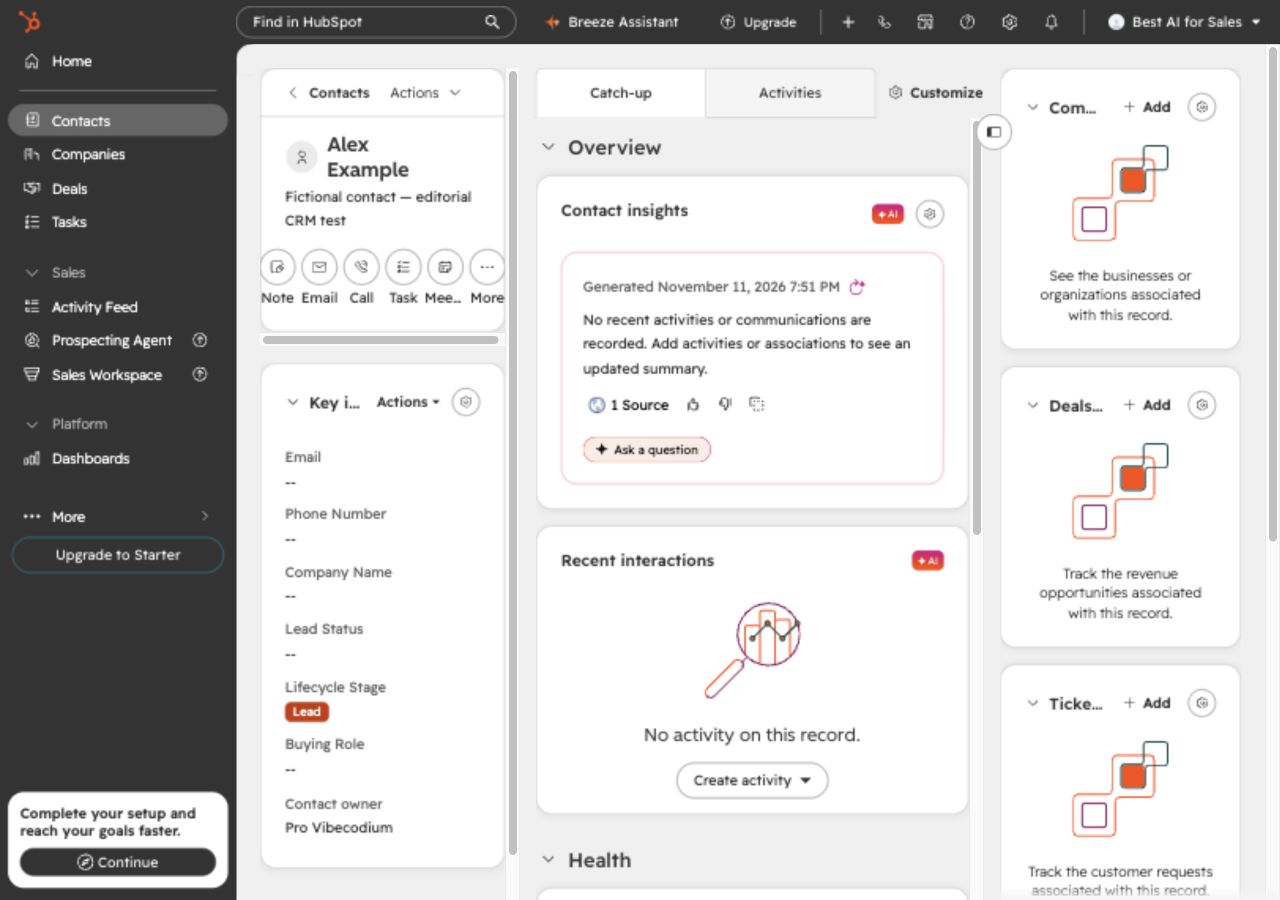
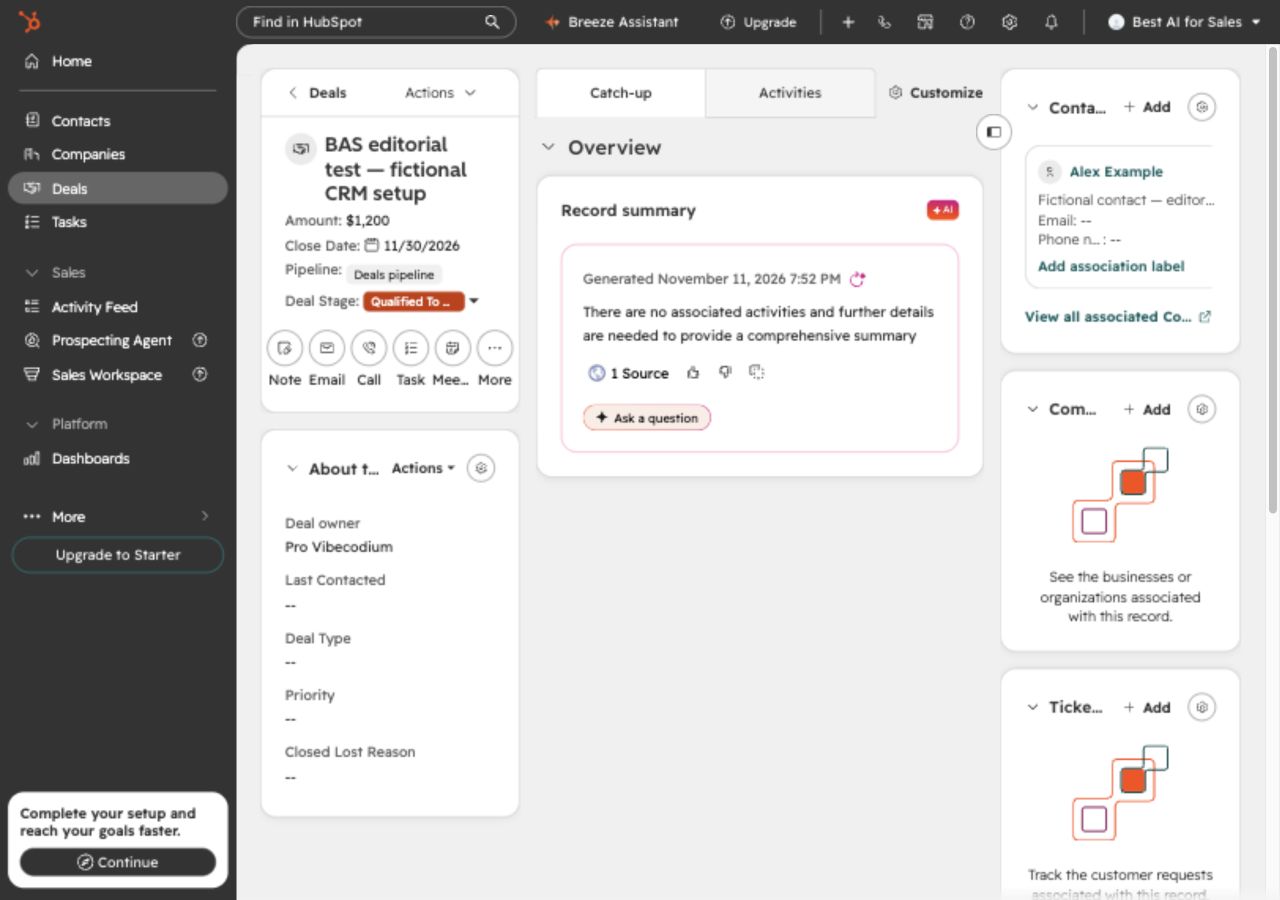
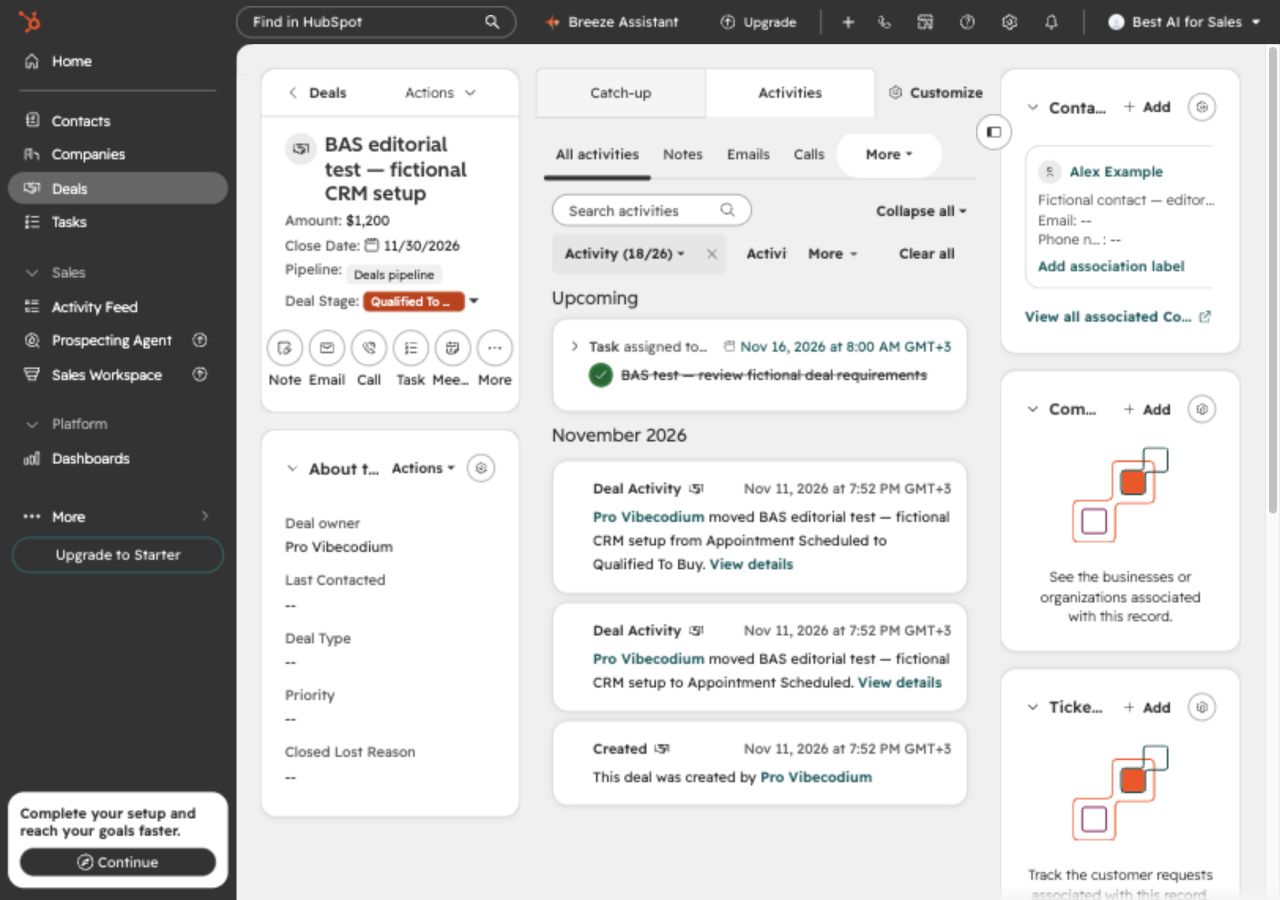
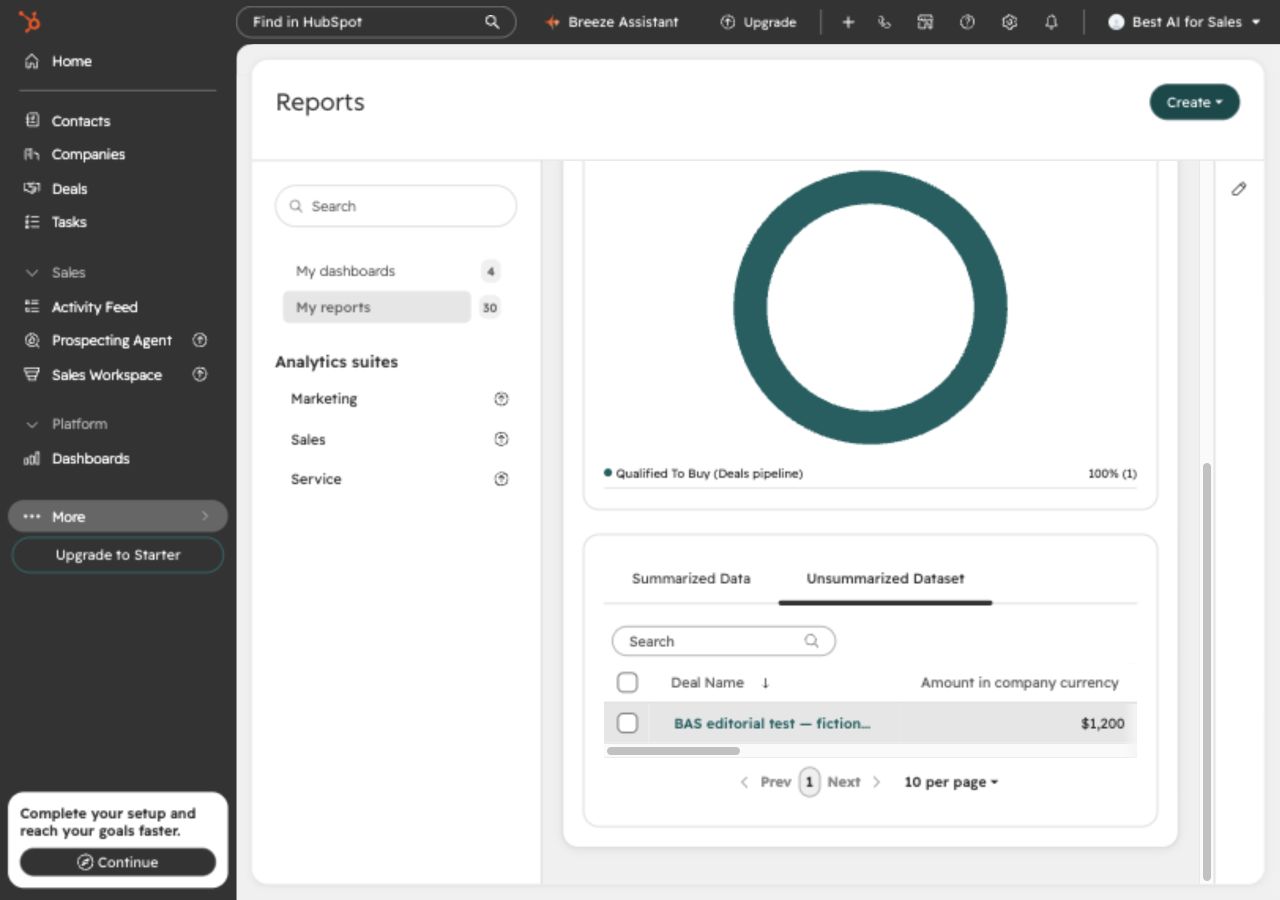
We completed contact → deal → task → report without upgrading or connecting an inbox. This supports Free as a starting point for a manually managed pipeline.
 Open full screenshot in a new tab
Step 1 · Create the contact
Alex Example was saved without an email address or phone number.
 Open full screenshot in a new tab
Step 2 · Link and move a deal
We linked a fictional $1,200 deal to Alex and moved it from Appointment Scheduled to Qualified To Buy.
 Open full screenshot in a new tab
Step 3 · Complete the next action
A manual to-do was linked to both records and marked complete. Email reminders were off.
 Open full screenshot in a new tab
Step 4 · Reconcile the report
We filtered Deals by Stage by our owner, saved a private copy, then reopened it: one deal, with $1,200 in its underlying row.
One EU Free account · Fictional data · Nov 11, 2026 · Paid automation not tested
Sample records count. Our fresh account included two sample contacts and a $1,000 sample deal. The initial report counted two deals; filtering by our assigned owner isolated the one we created.
Weighted amount is not revenue. Our $1,200 deal showed $480 at the stage’s preset 40% probability. That is $1,200 × 40%, not cash collected or a measured chance of closing.
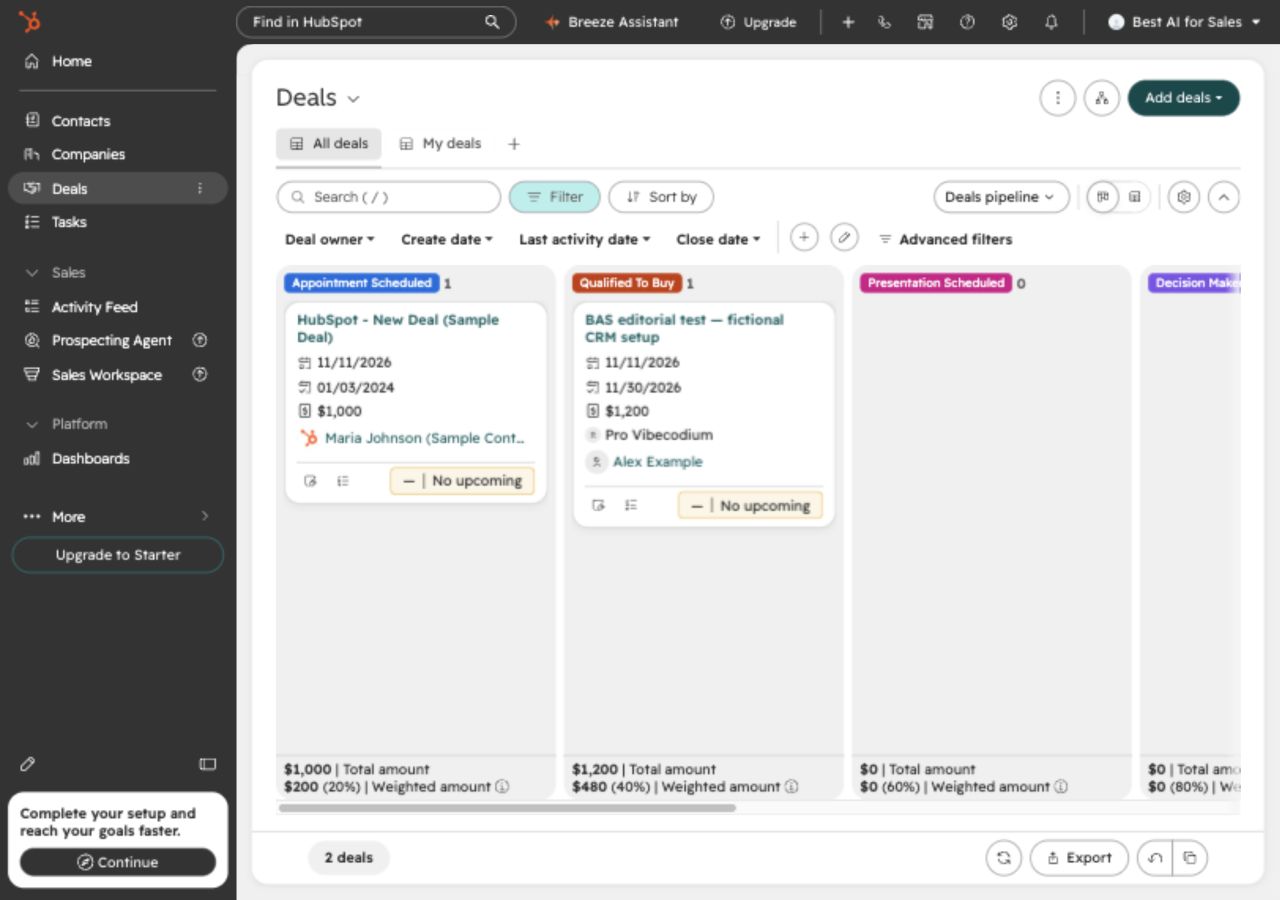 Open full screenshot in a new tab
One user in a new EU-hosted workspace, operated with AI-assisted browser navigation. Account & Billing showed Free before and after the test; no paid trial was started. All records we created were fictional. Screenshots show the actual interface.
This small workflow check does not measure scale, deliverability, migration effort, team permissions or ROI. We did not test inbox sync, sequences or custom report building. A saved, filtered copy of a supplied report is the reporting result demonstrated here.
Paid-feature guidance on this page comes from documentation. HubSpot’s report-library documentation (opens in a new tab) reserves some customization for Professional or Enterprise; confirm the exact report you need before upgrading.
Follow-up checks ·
Our small import worked, but a clean completion message hid a duplicate. Check record matching, user access and the exact automation you need before moving a live pipeline.
Tested in Free. We imported three fictional contacts, then repeated the file with two changed fields.
| Input | Observed result |
|---|---|
| Same two emails | 2 contacts updated; no new copies of those contacts. |
| Same name, no email or Record ID | 1 new contact: a duplicate, with 0 import errors. |
| Blank City / changed City | Dubai stayed Dubai / Abu Dhabi became Sharjah. |
| Two new deals, matched by contact email | 2 deals and 2 contact links; $2,400 and $3,600, with the intended stages. |
Before your import: choose a stable identifier for each object, map pipeline stages and owners, then test a small batch twice. Reconcile new/updated counts, field values and links. For later deal updates, use a supported unique identifier such as HubSpot Record ID; do not rely on the deal name. Matching rules (opens in a new tab).
Blank does not mean delete. Our result agrees with the import documentation (opens in a new tab). A community question about clearing fields (opens in a new tab) prompted this check; the thread itself is not our test evidence.
A record export is not a full backup. HubSpot documents current fields and associations in a record export (opens in a new tab); activities such as notes and calls need separate export methods. We generated an export, but did not verify the downloaded file or a round-trip restore.
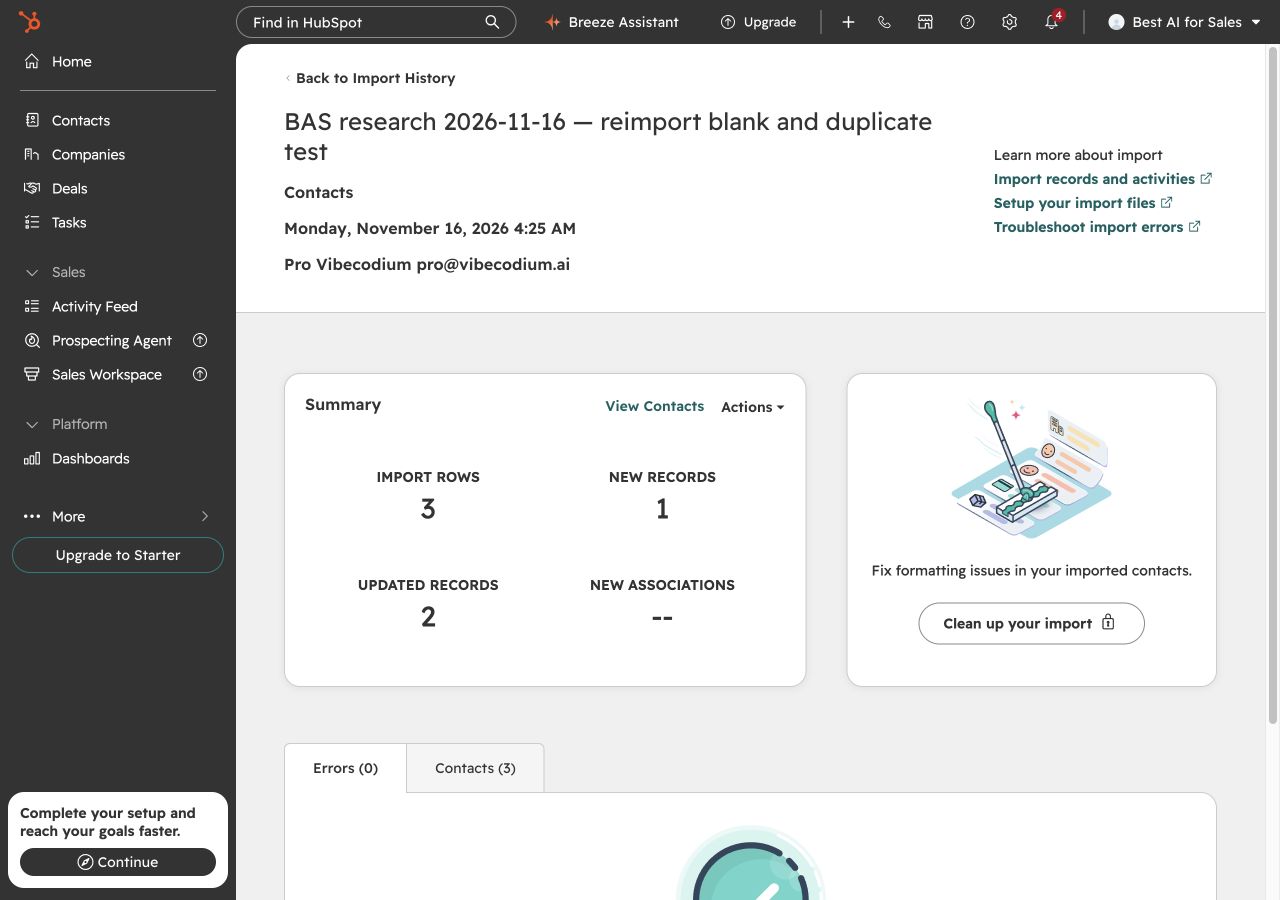 Open full screenshot in a new tabSee the retained City value (opens in a new tab) · See the imported deal and contact link (opens in a new tab)
Observed in our account: one active Super Admin, with a two-user limit. We did not add a second user or test visibility between colleagues. For three people who need access, budget beyond Free; do not count only sales reps.
Documented: a seat grants features; permissions narrow access. Record ownership and access to unassigned records matter. Import and export have separate permissions. “View” permission is not the same as a View-only seat. Check the permissions guide (opens in a new tab) for your plan.
Your acceptance test: under a non-admin teammate’s login, check an owned, another user’s and an unassigned contact/deal. Check associated records, tasks, reports and export access too. An administrator’s screen cannot establish what that teammate can see.
History needs a separate check. For new Free accounts, most record-timeline activities have a 30-day display window, with exceptions including notes and tasks. Older activity can still be available through activity index pages; this is not a claim that it is deleted. Documented history limits (opens in a new tab); we have not run a 30-day test.
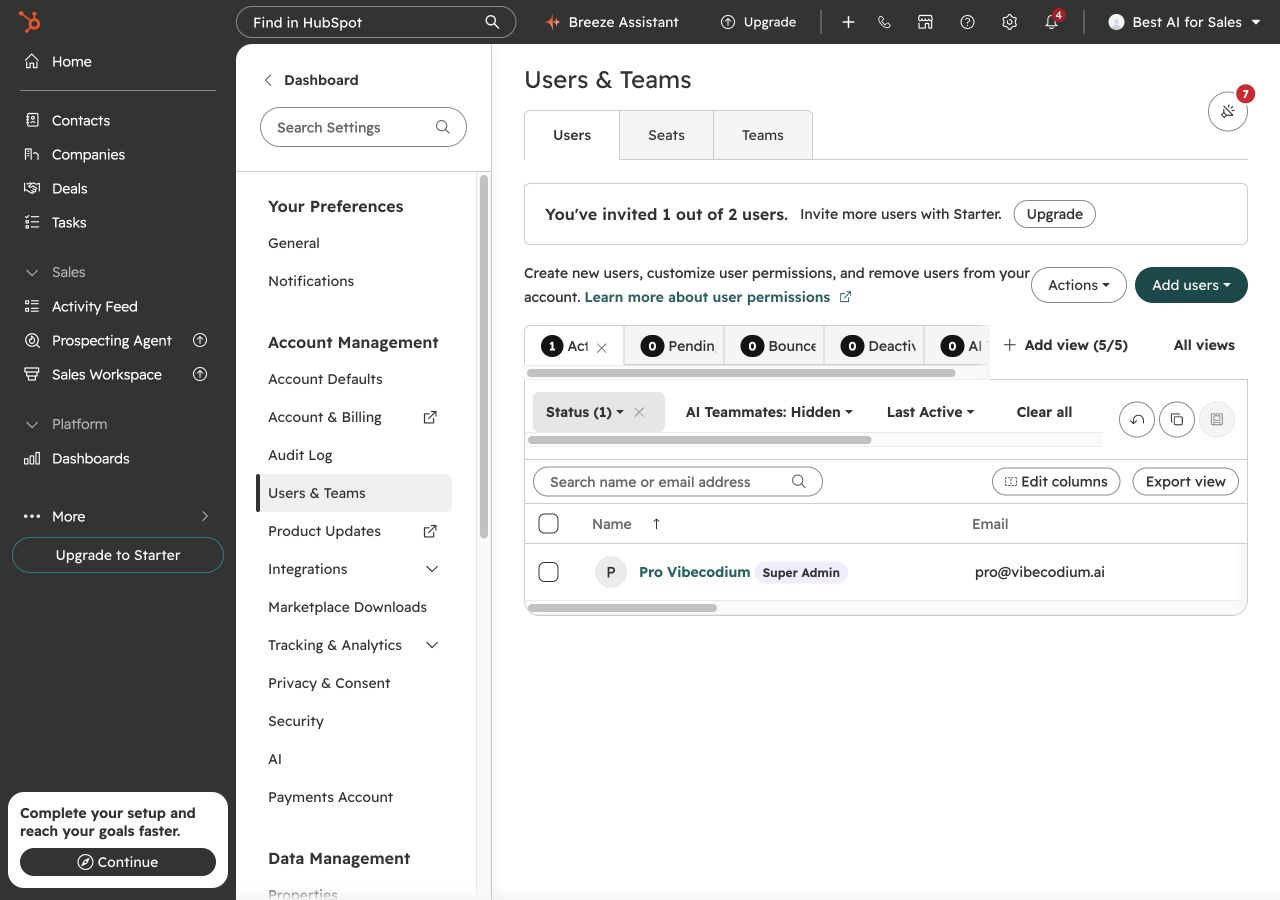 Open full screenshot in a new tab
Observed in Free: the Deals automation panel offered automatic task creation and follow-up reminders at Starter. Those actions were disabled. We did not activate a trial or run paid automations.
Free still includes limited form/email automation (opens in a new tab). Describe your trigger and required action before choosing a plan; the word “automation” alone is too broad.
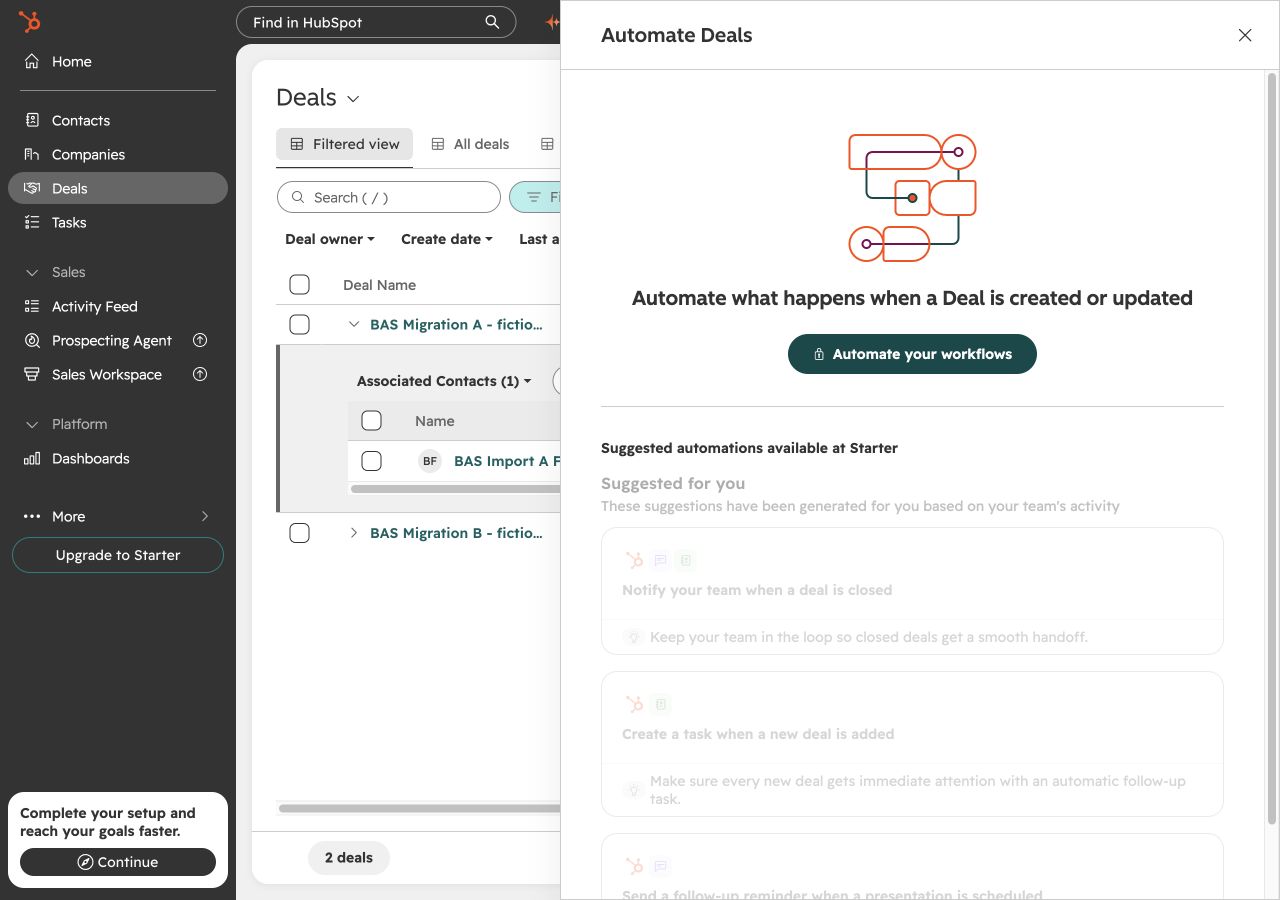 Open full screenshot in a new tab
Evidence scope: one EU-hosted Free account, fictional CSV data and AI-assisted browser navigation. We verified record values and associations in the interface. This does not measure migration time at scale, multi-user isolation or paid automation performance. Forum reports helped choose questions; current plan claims use official documentation checked on the date above.
A suggested evaluation, not a claim that we tested your setup. Free tools can validate CRM basics; request access to the paid features you need.
Import 10 records you are authorized to use. Check duplicates, field mapping, owners and contact-to-company links.
Connect a test inbox, log a reply, book a meeting and move the deal to its next stage. Confirm a teammate sees the right history.
On Professional or Enterprise, try a short sequence with test recipients. Check reply-based unenrollment and permissions. Reconcile a report with the underlying deals.
Export your sample. Record seat types, payment schedule, onboarding scope, renewal terms and optional costs in writing.
Keep the plan, date and observed results with your shortlist.
Share your experience using this tool
Loading published reviews…
Discover other tools that might also fit your needs
PipedriveLightweight CRM with kanban pipeline view
From $14/seat/mo · annual commitment
Price checked Oct 26, 2026
Salesforce Sales CloudCRM core platform for sales pipelines, forecasting, and automation
From $25/user/mo · annual commitment
Price checked Oct 26, 2026
 Apollo
All-in-one sales intelligence and engagement platform: a B2B contact database with verified emails and phone numbers, email sequences, a dialer, meeting scheduling and deal tracking, plus a Chrome extension for LinkedIn prospecting.
Free plan · Paid from $49/user/mo · annual commitment
Price checked Oct 26, 2026
 Clari
Sales forecasting and pipeline analysis, now presented as Clari Forecast within Salesloft. Brings individual and team forecasts together, tracks pipeline changes and highlights deal risk. Contact sales for the applicable package and quote.
Custom pricing
Price checked Oct 22, 2026
No external rating recorded
Explore articles that mention HubSpot Sales Hub and buying guides that include it.

Understand Monaco’s $10,000 credit commitment, estimate balance duration and use practical demo questions before changing your sales tools.

Build an AI sales workflow from trigger to approved draft and CRM task. Use explicit rules, failure handling and a pilot worksheet to measure the result.

Choose Apollo, HubSpot or both by sequence access, CRM sync limits and three-person costs on the same billing basis.

Compare free AI sales plans by users, credits, storage and meeting limits. Check which features stay free and test a complete workflow before relying on it.

Choose HubSpot, Apollo or Fireflies for your team's main task. Compare three-person costs, CRM limits and a first-year budget.

Check access, calculate pilot costs and control sending. Includes a budget calculator, our Free-account check and templates.

HubSpot note taker review: native CRM sync, Salesforce connector limits, eligible plans and seats, and recording and credit limits for your team.
Review HubSpot Sales Hub's current plans and test it with your own sales workflow before committing.